Cortex: the engine behind the chat window
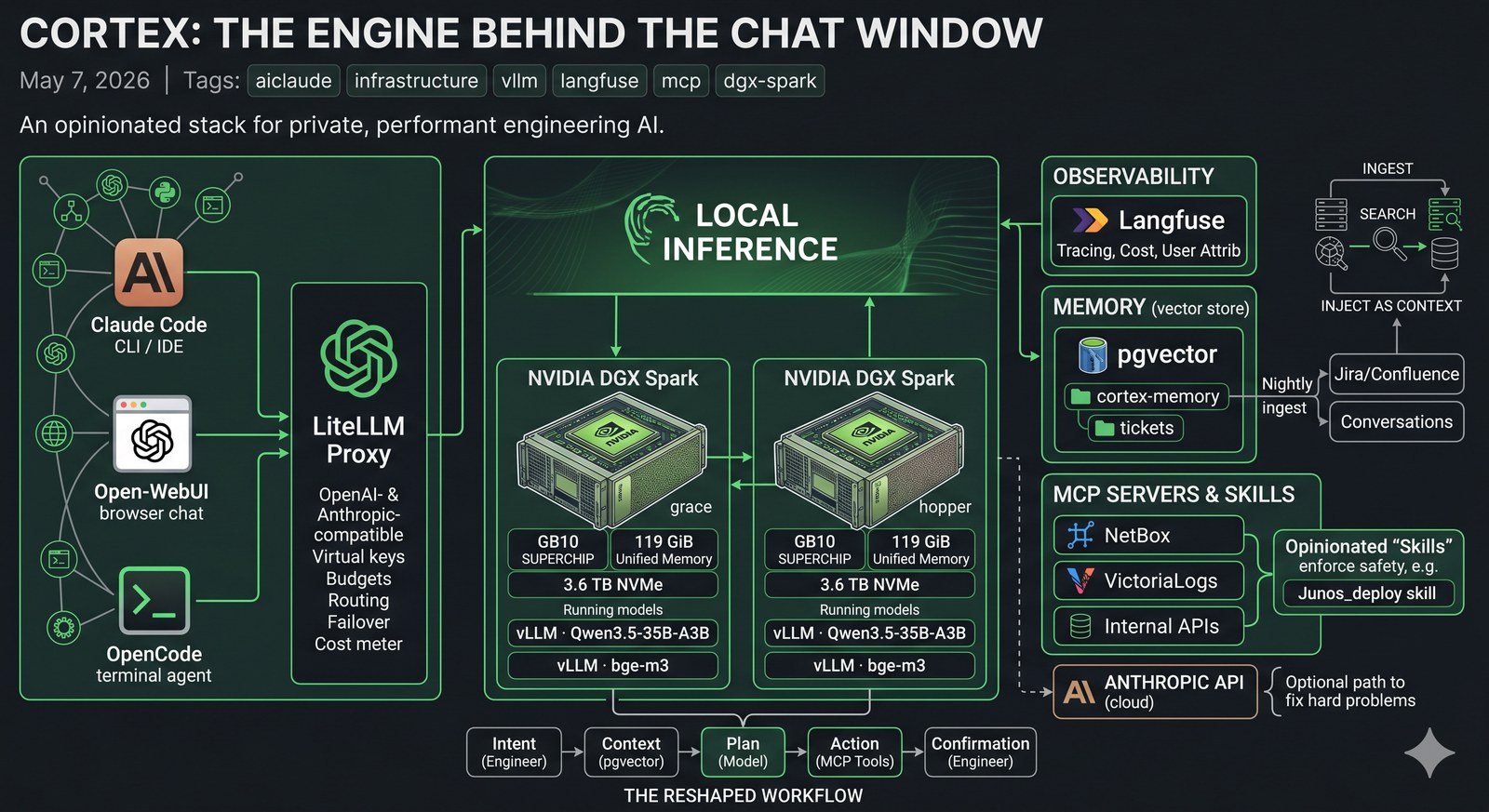
AI has completely changed how I work as an engineer. Not “made it faster.” Changed it. The shape of the work is different — what I spend my attention on, what I delegate, what I never type by hand again. We are never going back.
Yesterday I wrote about what an AI engineer actually does in a chat window — a 2.5-hour migration that touched six systems and ended with deployed config, a Confluence assessment, and a closed ticket. That post was about the surface.
This one is about the engine.
Because the chat window only feels magical because there’s an opinionated stack behind it. A pair of GB10 boxes serving a strong open-weight model. An OpenAI-compatible proxy that fans out across them. A tracing layer that records every call with cost and latency. A vector store that’s been quietly ingesting two years of tickets and conversations. A small army of MCP servers that let the model actually touch the systems we run on.
I call the whole thing Cortex. The image above is the one-glance version; the rest of this post walks the layers.
The hardware: two NVIDIA DGX Sparks
The two physical cornerstones are NVIDIA DGX Sparks — the small Grace Blackwell desktop boxes with the GB10 superchip, 119 GiB of unified memory, and a 3.6 TB NVMe each. They’re called grace and hopper because of course they are.
I run them as a matched pair. Same OS, same driver, same kernel, same containers. Each one runs:
- vLLM serving a Qwen3.5-35B-A3B model on port
8000(OpenAI-compatible API) - vLLM serving the
bge-m3embedding model on port8001
That gives me two identical inference endpoints I can treat as interchangeable. Each box can hold the full model in unified memory, so cold-start is fast and there’s no swap dance.
The point isn’t raw FLOPS — there are bigger boxes. The point is that the unified memory of GB10 makes a 35B-parameter mixture-of-experts model with a long context tractable on a desk-sized appliance, with predictable latency, and without paying per-token to anyone. After a year of paying token bills to cloud providers for routine work, owning the inference is a quiet relief.
The proxy: LiteLLM
In front of the two boxes lives LiteLLM, which I’ll just call “the proxy” from here. It is the most quietly important piece of the stack.
LiteLLM presents a single OpenAI-compatible (and Anthropic-compatible) endpoint to clients. Under the hood it can route to any of dozens of providers — local vLLM, Anthropic, OpenAI, Gemini, you name it. To a client, it just looks like one big API.
What the proxy gives me, in order of how much I’d miss it:
- Virtual keys per user. Every engineer who uses the stack gets their own API key. Each key has its own budget, model whitelist, and rate limits. Suspending an account is one DB row.
- Per-call cost tracking. Every request — local or cloud — is metered. I can answer “what did the team spend on Sonnet last month, broken down by user” with one SQL query.
- Failover. If
gracefalls over,hopperpicks up. If both fall over, I can route specific models to a paid provider for the duration. Clients don’t notice. - A clean upgrade story for models. I can add a
*-thinkingalias for the same backend withextra_body.thinking=trueand call it from anywhere. Or A/B-test a new model by routing 10% of traffic. Two lines of YAML. - One API surface for everything. Claude Code, OpenCode, Open-WebUI, n8n workflows, custom Python — all of them point at the same
/v1endpoint and get back consistent responses.
Load balancing across the GB10s
LiteLLM can do several routing strategies. For the local model I run simple-shuffle — random pick across two equal backends. With two identical boxes and stateless inference, it is plenty.
The interesting part isn’t the algorithm. It’s that the proxy treats grace and hopper as one logical model named qwen3.5-35b-a3b. Add a third Spark, add one line of config, clients see no change. Drop one for maintenance, traffic re-balances automatically the moment the health check fails.
This is the boring kind of magic that you stop noticing until you don’t have it.
Observability: Langfuse
Every single call through the proxy gets traced into Langfuse.
Langfuse is the closest thing the LLM space has to a Datadog. For each call it stores: prompt, response, latency, token counts, cost, the user (resolved from the API key back to a real identity), the model, the tools called, the conversation ID, and any custom metadata I attach.
What this actually lets me do:
- See exactly what a user typed when they say “Claude got it wrong.” Including the system prompt, the tool calls, and the model’s reasoning trace if it had one.
- Find slow tail calls. A 99th-percentile dashboard tells me which prompts are blowing the latency budget.
- Audit cost per project. Tagging each call with a project name turns “we spent X on AI” into a chargeback report.
- Build evals from production traffic. Curate a dataset of real prompts, replay them against a new model, diff the answers.
I bolted on a small custom callback (~30 lines of Python) that injects the real username into Langfuse’s user-attribution field before the trace is shipped, so every call is tied to an actual person, not a virtual key.
Memory and ticket ingestion
A bare LLM forgets. Cortex doesn’t.
A pgvector instance runs alongside the proxy with two collections that matter most: a cortex-memory collection for facts, decisions, conversation summaries, and lessons saved across sessions; and a tickets collection for every Jira ticket on the team’s main project, embedded with bge-m3 (1024 dimensions) and re-ingested nightly. Two-plus years of context. Description, comments, attachments, status changes, the whole thing.
When a prompt mentions a customer, a device, an error message, or a vague topic, an auto-recall hook does a parallel vector search across both collections and surfaces the top matches into the model’s context. The model reads them like it would read a CLAUDE.md file.
The combination is hard to overstate. “We had a similar issue a year ago” stops being a vague memory and becomes a specific ticket the model can cite, with the previous resolution one click away. New engineers can ask “has anyone done X before?” and get a real answer instead of a sympathetic shrug.
I’d been running this on Qdrant for the first year. Migrated to pgvector last week and reduced the moving parts from three to one — Postgres with a vector column. Faster cold-start, simpler backups, one fewer thing to babysit.
MCP servers
This is where the stack stops being a chat box and starts being a control plane.
Model Context Protocol (MCP) is a small spec for exposing tools to LLMs. The model gets a list of tool definitions; when it wants to use one, it emits a structured tool call; the host runs the tool and returns the result. Simple, but the consequences are large.
I run MCP servers for the systems we touch most:
- NetBox — full IPAM/DCIM access. List devices, query interfaces, find prefixes, look up cables. The model never has to guess where a host lives.
- VictoriaLogs — read-only access to the entire syslog firehose. The model can search for “BGP down on router X in the last hour” and get a structured answer.
- Jira / Confluence — search tickets, read pages, post comments. (Writes are gated behind a confirmation in the chat.)
- Vector search over the wiki — semantic search across the Confluence corpus and old runbooks.
- Custom internal services — alert correlation, a BMP-fed BGP dashboard, monitoring APIs.
The model decides which to call. It can call several in parallel. The proxy logs every tool call into Langfuse so I can see, in retrospect, exactly which systems the model touched while answering a given prompt.
There are also a couple dozen smaller “skills” — bash scripts and Python wrappers that aren’t formally MCP servers but get advertised to the model the same way. The line between “an MCP tool” and “a script the model knows how to run” is increasingly blurry. That’s fine. The contract is what matters.
Skills: the integration layer
Skills are the thing that takes a model from “talks well” to “actually fixes things.”
A skill is a small wrapper — usually a single bash script or a Python module — that gives the model a safe, opinionated way to do one specific thing in one specific system. The Junos deployment skill, for example:
- Locks the candidate config
- Runs
commit-checkbeforecommit - Refuses to run unless the linked Jira ticket is in
In Progress - Posts an audit comment back to Jira automatically
- Writes a session log to disk
The model doesn’t know any of that. It just calls junos_deploy <ticket> <config>, and the skill enforces the contract. If the contract is violated, the script errors out before anything reaches the device.
A few dozen of these skills, layered on top of MCP servers, layered on top of the proxy and the memory store, is the entire point. Each one is small. Together they’re a coherent platform.
What this enables
A few concrete things that wouldn’t be possible without the stack:
- Local-first by default. The bulk of model calls hit the GB10s and never leave the building. That’s a privacy story, a cost story, and a latency story all at once.
- Cloud where it matters. When I need Sonnet 4.6 or Opus 4.7 for a hard problem, the proxy fronts those too. Same key, same trace, same cost report. No client code changes.
- A real audit trail. Every call logged, tied to a user, with full prompt and response visible to operators. There is no shadow AI usage; if an answer was wrong, I can find the trace and replay it.
- Onboarding new tools is a Tuesday afternoon. Stand up an MCP server for a new system, register it with the proxy, push a new client config. The model picks it up next session.
- Colleagues are starting to pick it up. This part is easy to undersell. The stack stops being interesting the moment your colleagues stop noticing it and start relying on it, and that transition is well underway.
How my work has changed
I’ve been doing network and systems engineering long enough to remember when “automation” meant Ansible playbooks that someone wrote, version-controlled, and ran by hand. Then it meant CI/CD pipelines that ran those playbooks on a trigger. Then it meant Terraform modules with proper state.
This is different.
I used to spend half my day translating intent into mechanics. I want X — what’s the syntax, what’s the right interface, what’s the API endpoint, where’s the ticket template, what does the runbook say? That’s gone. I describe the situation; the model reads the systems; we discuss; I confirm the consequential moves. The mechanical parts have been delegated to something that knows them better than I do.
I used to keep a notebook of fragments — recently-used commands, syntax I always forget, the URL of the runbook for the thing that broke last quarter. The notebook is a vector store now. I never have to remember which page it was on.
I used to write a ticket, then write the change description, then write the test plan, then write the rollback, then deploy, then post the audit comment, then update the worklog. Now I have a conversation, confirm three times, and all of that exists. Written better than I would have written it, because the model isn’t tired at 4 PM on a Friday.
I read more code that I didn’t write than I used to. I write more code that I will only read once than I used to. Both of those feel right. The unit of work has shifted up a level.
There’s an obvious objection — isn’t this just hype? I’ve been building production network and systems for fifteen years. I am extremely allergic to hype. This isn’t hype. This is the same shape of change as the move from CLI to Ansible, or from physical to virtual, or from VMs to containers. It looks like productivity, but it’s actually a re-shaping of what an engineer’s day looks like.
We are never going back.
What I’d build next
A short list, in case anyone is building something similar and wants prior art:
- Per-project budgets that surface in chat. Showing “you have $4 left this week on cloud models” inline would change behaviour faster than a dashboard.
- Streaming traces in Langfuse. Right now traces land after the call completes. For long agent runs that’s fine; for live debugging it’s a small annoyance.
- A second region. Two GB10s in the same rack are a single failure domain. The next step is geographic redundancy — an identical pair in another building, fronted by the same proxy, with active-active routing.
- Self-service model registry. Every team that wants to add a model has to ask. A small admin UI is overdue.
The bigger point
The chat window is a thin layer.
Underneath it is a proxy that load-balances across two GB10s, a vector store with two years of institutional memory, MCP servers wired into every system the team uses, and a tracing layer that records every call. The model is the smallest piece. Everything else is the part that makes it useful.
If you’re building something similar — for your team, your homelab, your company — the order I’d recommend is:
- Get a proxy up first. Even if you only have one model behind it, the abstraction pays for itself the day you add the second.
- Turn on tracing immediately. You can’t tune what you can’t see.
- Add memory before you add skills. A model that remembers feels twice as smart as one that doesn’t.
- Write skills, not prompts. Anything you’d type more than twice belongs in a skill.
The DGX Sparks are nice. The model is nice. But the platform is what makes the work feel — finally, after a decade of “AI for ops” demos that never landed — like it has actually arrived.
And once you’ve worked this way for a month, you’re not going back either.